How to Change the Theme in Excel
A theme sets the colors, fonts and effects used across a whole workbook. Changing it restyles everything at once: tables, charts, shapes and cell styles.
-
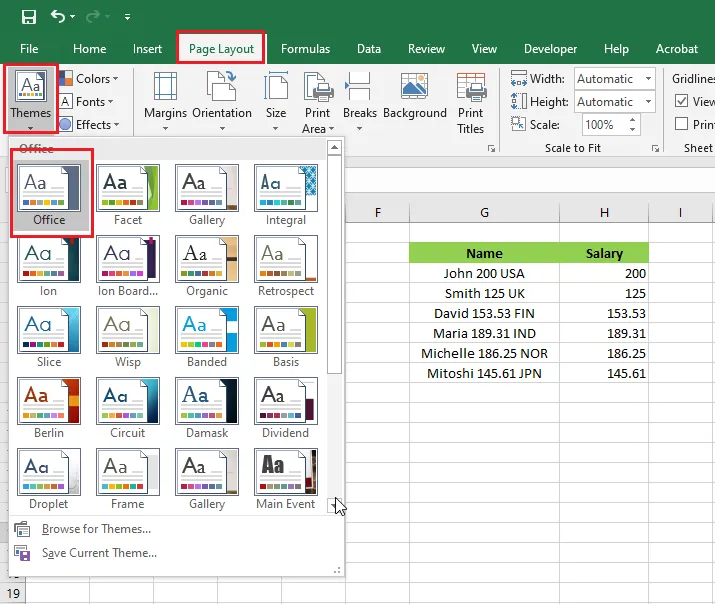
On the Page Layout tab, click Themes. Point to a theme to preview it, then click to apply it. New workbooks use the Office theme by default.
-
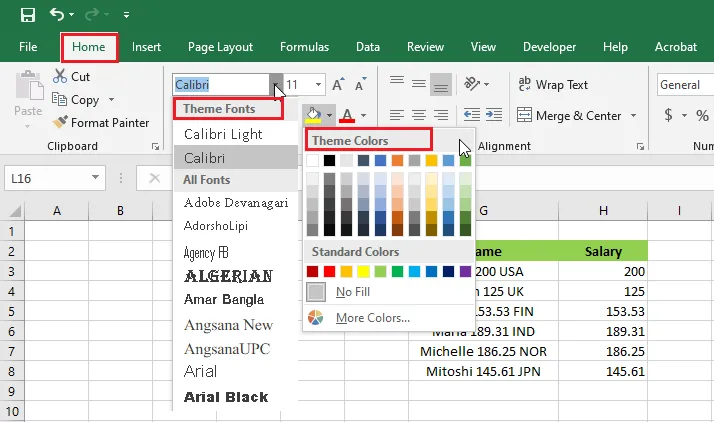
The theme’s colors and fonts then appear throughout Excel, for example in the color and font lists on the Home tab.
Tip: To change only part of the theme, use the Colors, Fonts or Effects buttons next to Themes.
Note: To reuse your design, click Save Current Theme at the bottom of the Themes gallery. It’s saved to your Document Themes folder and appears in the gallery for all your future workbooks.