10 Most Used Excel Functions
A handful of functions cover most everyday work in Excel. Here are the ten you’ll use most, each with a short example.
1. COUNT
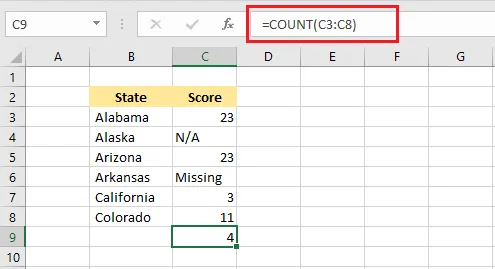
COUNT counts how many cells in a range contain numbers. Text and empty cells are not counted.
2. SUM
SUM adds up all the numbers in a range.
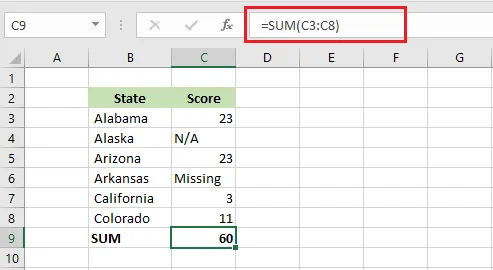
Note: SUM ignores cells that contain text.
3. AVERAGE
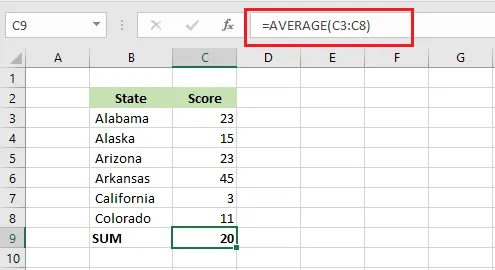
AVERAGE returns the arithmetic mean (simple average) of the numbers in a range.
4. IF
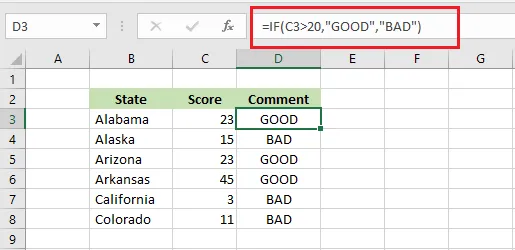
IF checks a condition and returns one value if it’s TRUE and another if it’s FALSE. Here, =IF(C3>20,"GOOD","BAD") returns GOOD when the score is above 20, and BAD otherwise.
5. COUNTIF
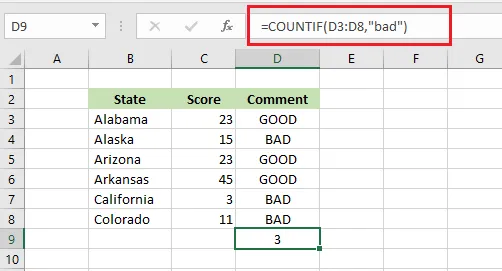
COUNTIF counts cells that meet a condition. =COUNTIF(D3:D8,"bad") counts how many comments are BAD: 3. The match is not case-sensitive.
6. SUMIF
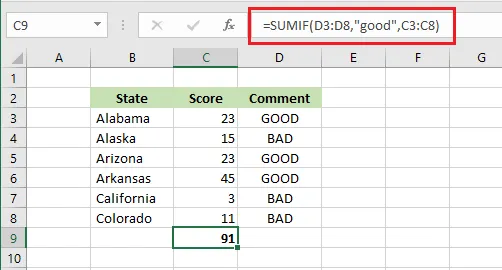
SUMIF adds the values that meet a condition. =SUMIF(D3:D8,"good",C3:C8) adds the scores whose comment is GOOD: 23 + 23 + 45 = 91.
7. VLOOKUP
VLOOKUP looks up a value in the first column of a table and returns a value from another column in the same row.
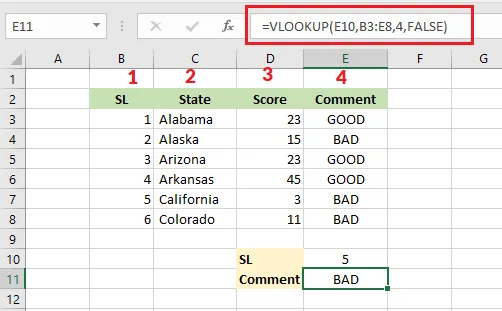
=VLOOKUP(E10,B3:E8,4,FALSE) works like this:
- It looks for the value in E10 (SL 5) in the first column of B3:E8.
- It counts the columns of the table: SL is 1, State is 2, Score is 3, Comment is 4.
- It finds 5 in the row for California and returns the value from column 4: BAD.
FALSE means “exact match only”.
Using Microsoft 365? Try XLOOKUP:
=XLOOKUP(E10,B3:B8,E3:E8). You point to the lookup column and the result column directly, so there’s no column number to count.
8. MIN
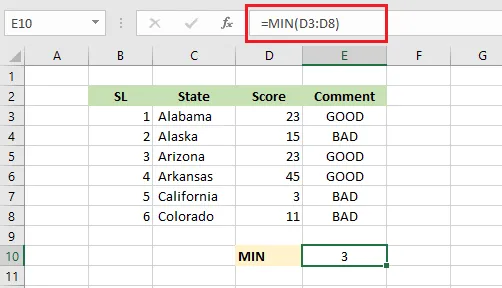
MIN returns the smallest number in a range.
9. MAX
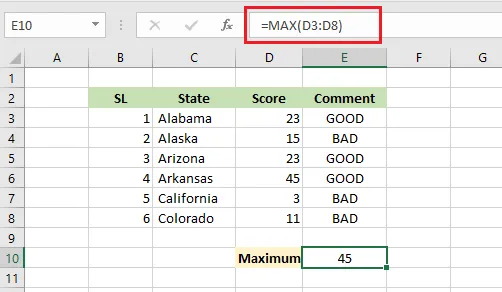
MAX returns the largest number in a range.
10. SUMPRODUCT
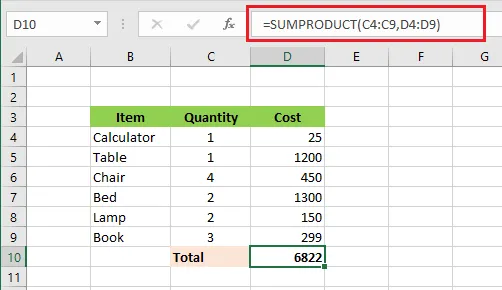
SUMPRODUCT multiplies matching cells in two (or more) ranges, then adds up the results. =SUMPRODUCT(C4:C9,D4:D9) multiplies each quantity by its cost and totals them:
(1 × 25) + (1 × 1200) + (4 × 450) + (2 × 1300) + (2 × 150) + (3 × 299) = 6822