How to Multiply in Excel
In Excel, the multiplication sign is the asterisk (*). Here are three ways to multiply.
Example 1: a formula
-
Select cell F3.
-
Type
=D3*E3and press Enter.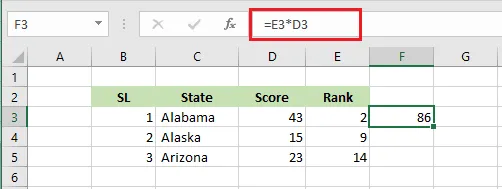
You can multiply as many cells as you like: =D3*E3*F3, and so on.
Example 2: the PRODUCT function
-
Select cell F3.
-
Type
=PRODUCT(D3:E3)and press Enter.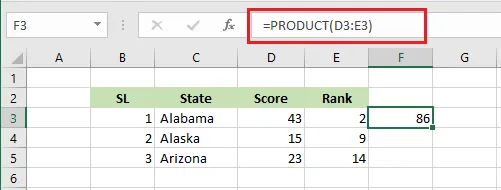
PRODUCT multiplies every number in the range, so it’s handy for long ranges. To repeat the calculation for each row, drag the fill handle of F3 down to F5.
Example 3: multiply without a formula
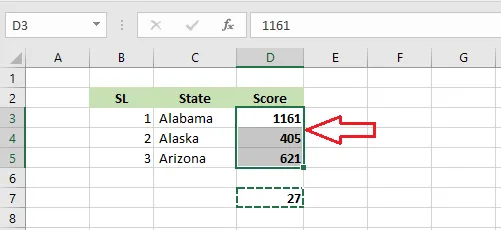
To multiply each value in D3:D5 by the number in D7:
-
Select D7 and copy it (Ctrl + C).
-
Select D3:D5, right-click, and click Paste Special.
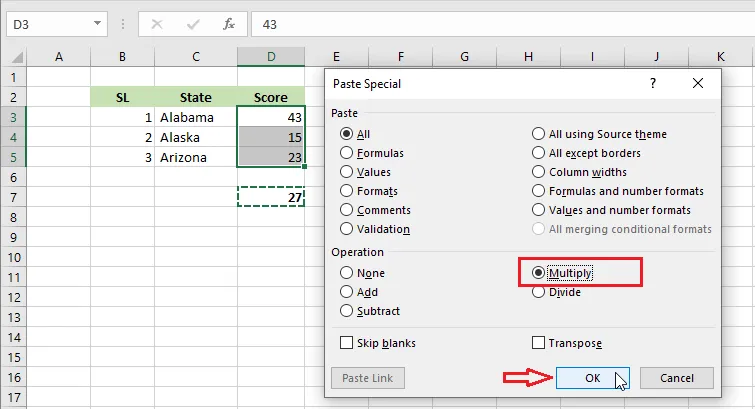
-
Under Operation, choose Multiply, then click OK.
Result: each number in D3:D5 has been multiplied by 27.