How to Show Formulas in Excel
Normally Excel shows a formula’s result in the cell, and the formula only in the formula bar. Here’s how to see every formula at once.
-
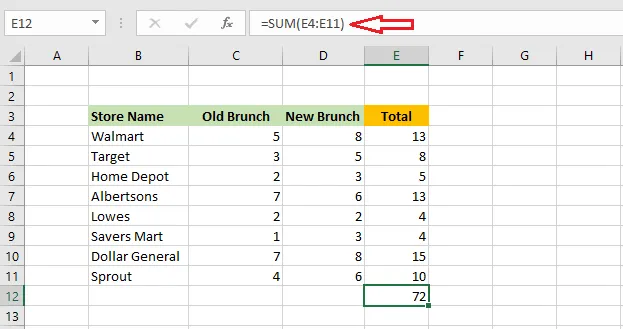
Select cell E12 to see its formula in the formula bar.
-
Press Ctrl +
</kbd>. The <kbd>key (grave accent) is usually below Esc, to the left of 1.
Result: every cell shows its formula instead of its result.
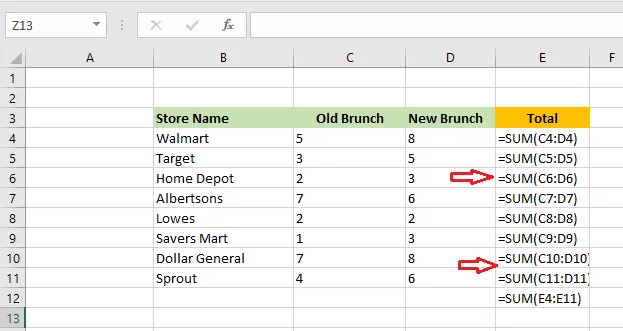
- Press Ctrl + ` again to go back to normal.
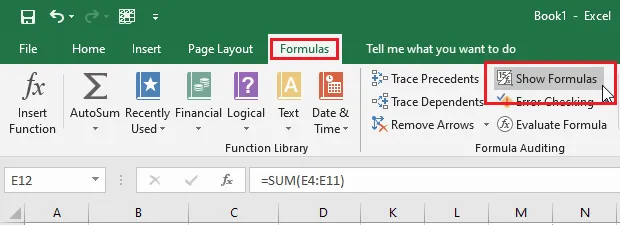
You can also click Formulas > Show Formulas to switch it on and off.
Show one formula in another cell
The FORMULATEXT function displays a cell’s formula as text. For example, in cell C13, type =FORMULATEXT(E12).
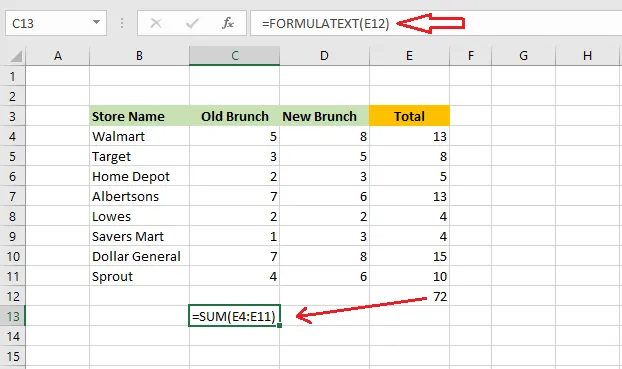
Result: C13 shows the formula in E12. It updates if the formula changes.